
Overclock stability
Catches WHEA hardware errors per core, flags clock stretching from too little voltage, and logs session crashes. Test runs are named and end with a pass or fail, so you can compare settings across overclock setups.
ThrottleScope is a free CPU stability, overclocking and Curve Optimizer undervolting monitor for Windows. Run it with your stress tests or while gaming to catch thermal data or core instability events.
Create and log test runs, so you can compare performance across overclock setups. ThrottleScope records every moment your CPU throttled, whether from heat, a power or current limit, or the firmware.
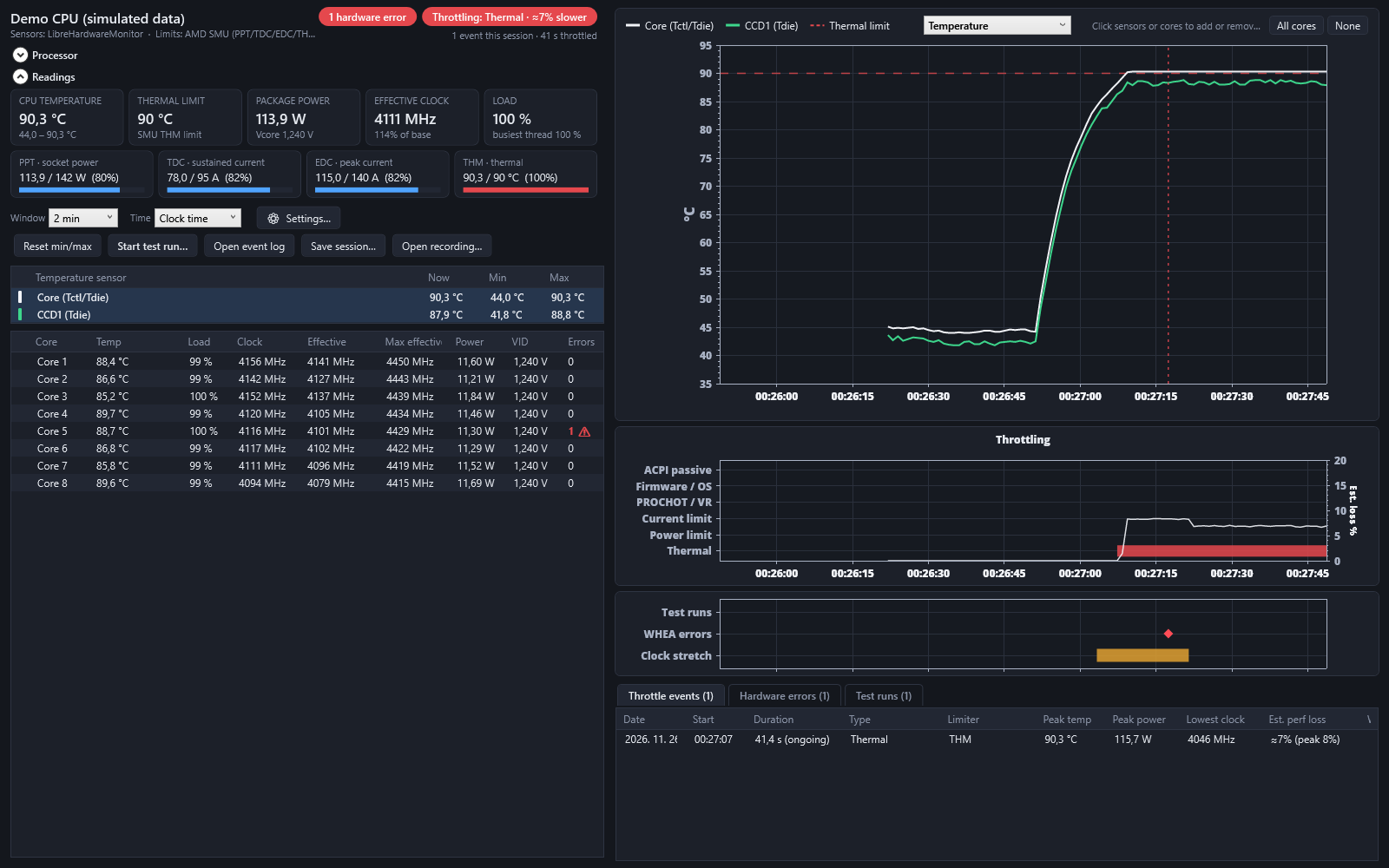
Catches WHEA hardware errors per core, flags clock stretching from too little voltage, and logs session crashes. Test runs are named and end with a pass or fail, so you can compare settings across overclock setups.
Thermal, power limit (PPT / PL1 / PL2), current limit (TDC / EDC), PROCHOT, firmware and ACPI. Each slowdown is logged with its peak temperature, lowest clock and an estimate of the speed it cost.
Temperature, load, clock, effective clock, power and voltage for each core, with minimum and maximum. Graph any of them for as many cores as you like, against clock time or time elapsed.
Every session is recorded and can be reviewed later in the viewer mode: open one, click any moment to see every reading, or export to CSV.
| Released | 26 November 2026 |
|---|---|
| File | ThrottleScope-1.0.0-setup.exe (57 MB) |
| System | Windows 10 or 11, 64-bit |
| SHA-256 | F7C20DE7F0D9D47C5ADB8ED0D38EA6590A9467D651A68FF42A6F09F3BCAD7D4A |
Prefer no installer? Get the portable zip (9.9 MB; needs the .NET 9 Desktop Runtime and the PawnIO driver).
ThrottleScope-1.0.0-setup.exe and accept the administrator prompt.To remove ThrottleScope, use Settings → Apps. It asks whether to delete your settings, logs and recordings too.
| Processor | What ThrottleScope reads |
|---|---|
| AMD Ryzen desktop, Zen 2 to Zen 5 | Per-core temperatures and the PPT, TDC, EDC and THM limiters from the SMU |
| Intel Core | Per-core temperatures and the CPU's own throttle-reason registers (thermal, PL1/PL2, PROCHOT, current) |
| Any x64 CPU | Windows performance counters: firmware/OS performance limit and ACPI thermal throttling |
CPU temperatures, clocks and power limits are stored in processor registers that Windows only lets drivers read. ThrottleScope reads them through PawnIO with readonly processes; it never changes clocks, voltages or limits.
WHEA is how Windows reports hardware errors. A "corrected" error means the CPU caught and fixed a mistake. On a stock system they're rare. During overclocking or undervolting they're the earliest sign that a setting isn't fully stable.
While the CPU throttles, ThrottleScope compares the clock of the busy cores with the clock they reached at a similar load without throttling. It's an estimate, not a benchmark, but it tells a 1% nudge apart from a 20% slowdown.
Everything stays on your PC, in %LOCALAPPDATA%\ThrottleScope: settings, the throttle event and test run logs,
and session recordings. You set how long recordings and logs are kept in Settings. ThrottleScope sends nothing anywhere.
Yes. Laptops throttle more often than desktops, which makes the timeline especially useful there. How much detail you get depends on the processor; see the table above.